Introduction
HP ProDesk and HP Spectre x360 sit at opposite ends of HP’s product map, and that’s the point of this comparison. The ProDesk is a business desktop tower or mini PC built for office reliability, easy servicing, and long duty cycles. The Spectre x360 is a premium convertible laptop built for portability, display quality, and creative work on the move. They aren’t really competing for the same buyer, but plenty of people shopping for a new work or home setup end up cross-referencing the two — usually because they’re deciding between “a desktop that does everything at my desk” and “a laptop that does everything wherever I am.” This guide breaks down where each one wins so you can match the machine to how you actually work.
One quick note before diving in: HP has been folding the Spectre name into its newer OmniBook Ultra line since early 2026, so if you shop today you may see the same hardware family listed as “OmniBook Ultra” or “OmniBook Ultra Flip.” The Spectre x360 is still sold and supported, so the comparison below remains valid, but it’s worth knowing the naming is in transition.
HP ProDesk vs HP Spectre x360: Quick Comparison
| HP ProDesk | HP Spectre x360 | |
|---|---|---|
| Form factor | Desktop tower / SFF / Mini PC | 13″–16″ convertible 2-in-1 laptop |
| Target user | Business, IT fleets, office workstations | Professionals, creatives, students on the go |
| CPU | Intel Core (12th–14th Gen) or Core Ultra desktop chips | Intel Core Ultra (Meteor Lake / Lunar Lake) mobile chips |
| Graphics | Integrated UHD, optional discrete (NVIDIA A400, AMD RX 6300) | Integrated Intel Arc only |
| Display | Sold separately (any external monitor) | Built-in 13″–16″ OLED touch, up to 3K/4K |
| Upgradeability | High — tool-less chassis, accessible RAM/storage | Very low — soldered RAM, limited SSD access |
| Portability | None (fixed workstation) | High — 3–4 lb convertible chassis |
| Battery | N/A (plugged in) | Up to ~13–16 hours rated |
| Starting price | Lower for comparable performance | Higher, premium build tax |
| Best for | Fixed-desk productivity, multi-monitor setups | Mobile professionals, hybrid work, content creation |
Overview of HP ProDesk
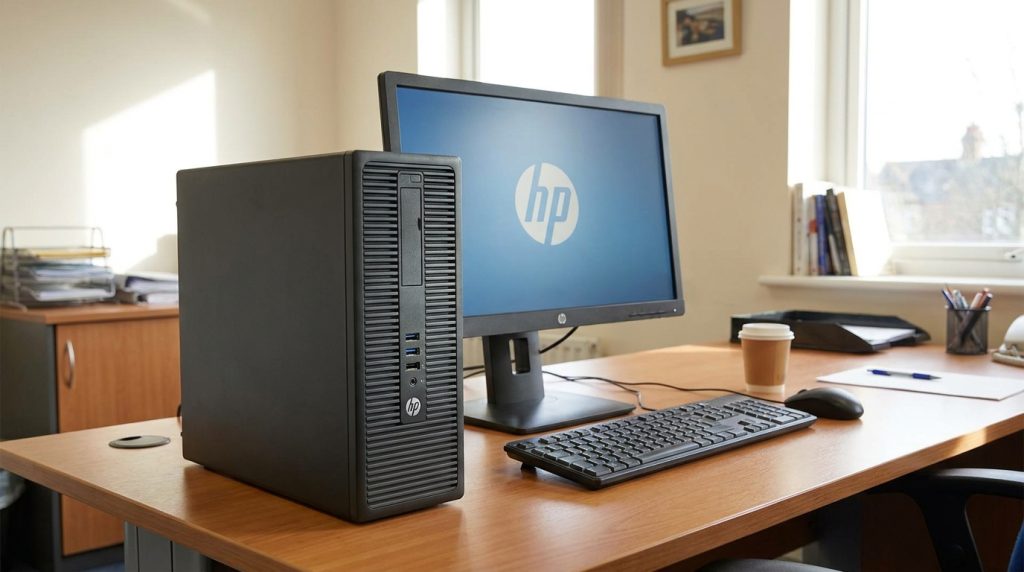
The ProDesk line is HP’s mainstream business desktop family, sitting below the higher-end EliteDesk in HP’s commercial lineup. It’s built around Intel Core and newer Core Ultra desktop processors, with configurations spanning small-form-factor towers, full towers, and Mini PCs. HP designs the ProDesk chassis for IT departments: tool-less access panels, standardized parts across generations, and support for HP’s Wolf Security suite for fleet management. It isn’t flashy, but it’s dependable, easy to service, and configurable with flexible “Flex I/O” ports that let a company standardize on VGA, HDMI, DisplayPort, or USB-C depending on what their monitors need.
Overview of HP Spectre x360
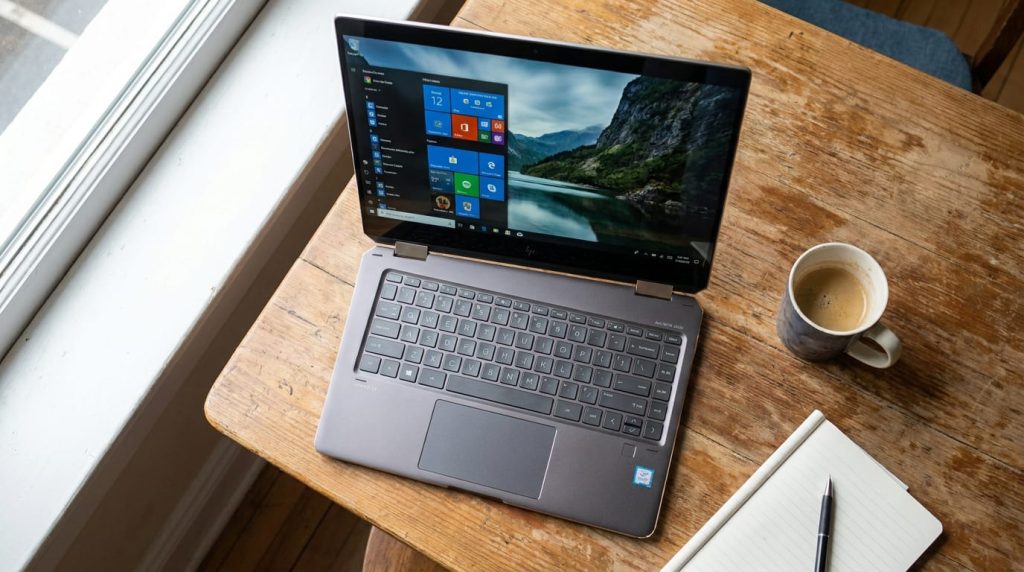
The Spectre x360 is HP’s flagship consumer convertible, known for its gem-cut aluminum chassis, OLED touchscreens, and 360-degree hinge that folds from laptop to tablet mode. It targets people who want a premium, portable machine for writing, presentations, photo editing, and everyday multitasking, backed by an included HP pen on most configurations. Recent models run on Intel Core Ultra “Meteor Lake” or “Lunar Lake” silicon with Intel Arc integrated graphics, strong all-day battery life, and Thunderbolt 4 connectivity. As mentioned above, HP has started rebranding this family under the OmniBook Ultra name, but the design language and positioning carry over directly.
Key Specifications Comparison
- Processor: ProDesk offers desktop-class Intel Core i3/i5 (13th/14th Gen) up through Core Ultra desktop chips with higher sustained clocks and no thermal throttling under load. Spectre x360 uses mobile Core Ultra chips (e.g., Ultra 7 155H, Ultra 7 256V) tuned for efficiency over raw sustained speed.
- Memory: ProDesk supports user-upgradeable DDR4/DDR5 SO-DIMM or UDIMM modules up to high capacities. Spectre x360 uses soldered LPDDR5x, configured at purchase and not upgradeable later, typically 16GB or 32GB.
- Storage: ProDesk supports dual M.2 SSD bays plus optional HDD on select models. Spectre x360 has a single M.2 PCIe Gen4 SSD slot, from 512GB up to 2TB.
- Graphics: ProDesk can add a discrete card (NVIDIA A400, AMD Radeon RX 6300) for multi-display or light professional graphics work. Spectre x360 relies entirely on integrated Intel Arc graphics — no discrete GPU option.
- Display: ProDesk has no built-in display; you attach any monitor(s) you want, up to seven on the high-end SFF configuration. Spectre x360 ships with a 13″–16″ OLED touchscreen, often 3K or higher resolution.
Design and Build Quality
The ProDesk prioritizes function over form: a matte, boxy chassis meant to sit under a desk or mount behind a monitor, with a tool-less side panel for quick internal access. It’s not something you show off, but it’s practical and durable for years of office use. The Spectre x360, by contrast, is one of HP’s most design-forward products — CNC-machined aluminum, angled “gem-cut” edges, and a convertible hinge that lets the screen fold flat or into tent/tablet modes. If aesthetics and a premium in-hand feel matter to you, the Spectre x360 is in a different league; if the machine lives under a desk and is judged only by what plugs into it, the ProDesk’s design is irrelevant to daily use.
Display Comparison
This is really a non-comparison, because the two products solve display needs completely differently. The ProDesk has no screen at all — you pair it with whatever monitor(s) suit your work, from a single budget 1080p display to a multi-monitor professional array, and you can upgrade that display independently of the PC. The Spectre x360’s screen is fixed and is genuinely one of its strongest selling points: OLED panels with rich contrast, wide color coverage (100% DCI-P3 on many configurations), touch and pen support, and refresh rates up to 120Hz on newer models. If display quality out of the box matters and you don’t want to shop separately for a monitor, Spectre x360 wins outright; if you want display flexibility or already own monitors, ProDesk’s approach is more cost-effective.
Performance and Hardware
Desktop processors in the ProDesk generally sustain higher clock speeds for longer because they aren’t constrained by a thin laptop chassis’s thermal envelope — a real advantage for continuous workloads like compiling code, running VMs, or batch data processing. The Spectre x360’s mobile chips trade some sustained performance for power efficiency and lower heat, which is the right tradeoff for a machine that has to run on battery and stay quiet on a lap. For single-threaded responsiveness and everyday productivity (browsing, office apps, video calls), both feel snappy; for sustained multi-core workloads, the ProDesk desktop chips generally pull ahead.
Graphics Performance
The ProDesk’s optional discrete GPU (NVIDIA A400 or AMD Radeon RX 6300) is aimed at business graphics tasks — CAD viewing, multi-display output, light content work — rather than gaming, but it still meaningfully outperforms any integrated graphics solution. The Spectre x360 is limited to Intel Arc integrated graphics, which handles creative apps like Lightroom or Premiere reasonably well and can manage light gaming at reduced settings, but it can’t match a discrete GPU for demanding 3D or GPU-accelerated workloads. Neither machine is built as a gaming rig, but the ProDesk has more graphics headroom if you configure it with the discrete option.
RAM and Storage Options
The ProDesk’s biggest practical advantage is upgradeability: RAM and storage are customer-accessible, so you can buy a modest configuration now and add memory or a second SSD later as needs grow — useful for businesses trying to extend hardware lifecycles. The Spectre x360’s RAM is soldered to the motherboard, so whatever you choose at checkout (typically 16GB or 32GB) is permanent, and SSD swaps are possible but not something HP designs for easy end-user access. If you value being able to upgrade a machine over time without replacing it, this is a clear point in the ProDesk’s favor.
Ports and Connectivity
ProDesk models offer generous, configurable I/O — legacy ports like VGA and PS/2 are still available alongside USB-C, DisplayPort, HDMI, and Ethernet, letting IT departments match ports to existing office peripherals. The Spectre x360 keeps things minimal in the name of thinness: typically two Thunderbolt 4/USB4 ports, one USB-A, and a headphone jack, with no built-in Ethernet, HDMI, or SD card reader — you’ll need a dock or adapter for anything beyond USB-C peripherals and external displays. For an office setup with printers, multiple monitors, and wired networking, ProDesk’s connectivity is simpler to work with out of the box.
Battery Life and Power Consumption
This category only applies to the Spectre x360, since the ProDesk is a plugged-in desktop with no battery. Spectre x360 models are rated for roughly 13–16 hours of video playback in ideal conditions, with real-world mixed use typically landing in the 9–12 hour range — enough for a full workday untethered from an outlet. The ProDesk, meanwhile, draws standard desktop wall power continuously, though HP does design it to meet ENERGY STAR efficiency standards for a “typically configured” system.
Upgrade and Repairability
The ProDesk is explicitly designed for repairability: a tool-less chassis, standard-fit components, and modular expansion bays mean a technician (or a reasonably capable user) can swap RAM, storage, or the power supply in minutes. HP even markets the platform’s extended usable life as a selling point for reducing e-waste and total cost of ownership. The Spectre x360 is a sealed, thin-and-light laptop where most internal components are soldered or held with specialty screws and adhesive; repairs are realistically a job for HP service or an authorized technician, not a weekend upgrade project.
Operating System and Software
Both lines run Windows 11 (Home or Pro depending on configuration), so day-to-day OS experience is largely identical. The ProDesk leans toward Windows 11 Pro configurations bundled with HP’s business management and security tools for IT fleets. The Spectre x360 is typically sold with Windows 11 Home aimed at individual consumers, along with HP’s Command Center for performance/thermal profiles and creative-focused extras like the HP Pen software for note-taking and sketching.
Security Features
The ProDesk is built around HP’s business security stack — HP Wolf Security, TPM-based protections, and (on select configurations) IR facial recognition cameras — all aimed at protecting company data across a fleet of managed machines. The Spectre x360 includes consumer-grade security essentials: fingerprint reader, Windows Hello IR camera, and a physical webcam kill switch on many models, solid for personal use but not built around the same fleet-management security tooling as the ProDesk.
Best Use Cases
- HP ProDesk fits: office workstations, call centers, multi-monitor accounting or data-entry roles, home offices where you already have a monitor, and any setup that benefits from easy future upgrades.
- HP Spectre x360 fits: professionals who travel or work from multiple locations, students who need one machine for class and creative projects, hybrid workers who want a premium laptop for both meetings and content creation, and anyone who wants a touchscreen/pen-enabled convertible.
Pros and Cons
HP ProDesk
- Pros: Strong sustained performance, easy upgrades, flexible ports, better long-term value, optional discrete graphics
- Cons: Not portable, needs a separate monitor/keyboard/mouse, less visually distinctive
HP Spectre x360
- Pros: Excellent OLED display, premium build, genuinely portable, strong battery life, pen and touch support
- Cons: No upgradeability, limited graphics power, fewer ports without a dock, higher price for comparable specs
Price and Value for Money
Configuration for configuration, the ProDesk typically delivers more raw computing performance per dollar, since desktop components cost less than their mobile, power-efficient counterparts, and you’re not paying for a built-in display, battery, or ultra-thin chassis engineering. The Spectre x360 costs more for similar core specs, but that premium buys portability, an excellent screen, and industrial design — value that’s real if you actually need to move the machine, but wasted if it’s just going to sit on a desk. Factor in that you’ll need to budget separately for a monitor, keyboard, and mouse with the ProDesk, which narrows the gap somewhat for a complete setup.
Who Should Buy HP ProDesk?
Choose the ProDesk if you work from a fixed location, want the most performance for your budget, expect to upgrade components over the machine’s lifespan, or are outfitting multiple employees where IT manageability and serviceability matter more than portability or design.
Who Should Buy HP Spectre x360?
Choose the Spectre x360 if you need a single machine that goes with you between home, office, and travel, want a best-in-class display for creative or media work, plan to use pen/touch input, or simply prioritize a premium, polished device over raw upgrade flexibility.
Frequently Asked Questions (FAQs)
Is HP Spectre x360 being discontinued? Not exactly — HP has started rebranding the Spectre line as “OmniBook Ultra” starting in 2026, but existing Spectre x360 models remain on sale and supported. New purchases of this design going forward will increasingly appear under the OmniBook Ultra name.
Can I upgrade RAM on the HP Spectre x360? No. RAM is soldered to the motherboard and must be selected at the time of purchase. The HP ProDesk, by contrast, uses upgradeable memory modules.
Does the HP ProDesk come with a monitor? No. The ProDesk is a desktop tower, SFF, or Mini PC only — you’ll need to purchase a monitor, keyboard, and mouse separately, though HP sells bundles that include them.
Which is better for gaming? Neither is designed as a gaming machine, but a ProDesk configured with the optional discrete GPU will outperform the Spectre x360’s integrated Intel Arc graphics for anything beyond light or older titles.
Which has better battery life? This only applies to the Spectre x360, which is rated for up to 13–16 hours depending on configuration and usage. The ProDesk is a desktop and runs on wall power.
Final Verdict
The HP ProDesk and HP Spectre x360 aren’t really rivals — they’re built for different jobs. The ProDesk is the smarter choice when you want maximum, upgradeable performance for a fixed desk setup at a lower total cost. The Spectre x360 is the smarter choice when portability, display quality, and design matter as much as raw specs. Rather than asking “which is better,” the more useful question is where the machine will actually live and how you work day to day — that answer will point you to the right one.