1. Introduction
Comparing the ADATA Legend 960 Max against the HGST Ultrastar 7K6000 is less about picking a “winner” and more about understanding two drives built for almost opposite jobs. The Legend 960 Max is a consumer/prosumer PCIe 4.0 NVMe SSD designed for speed — gaming, video editing, and everyday responsiveness. The Ultrastar 7K6000 is a 7,200 RPM enterprise SATA/SAS hard drive designed for one thing: storing enormous amounts of data reliably and cheaply, for years, in a server rack. This guide breaks down where each drive shines, where it falls short, and which one actually fits your use case.
2. ADATA Legend 960 Max Overview
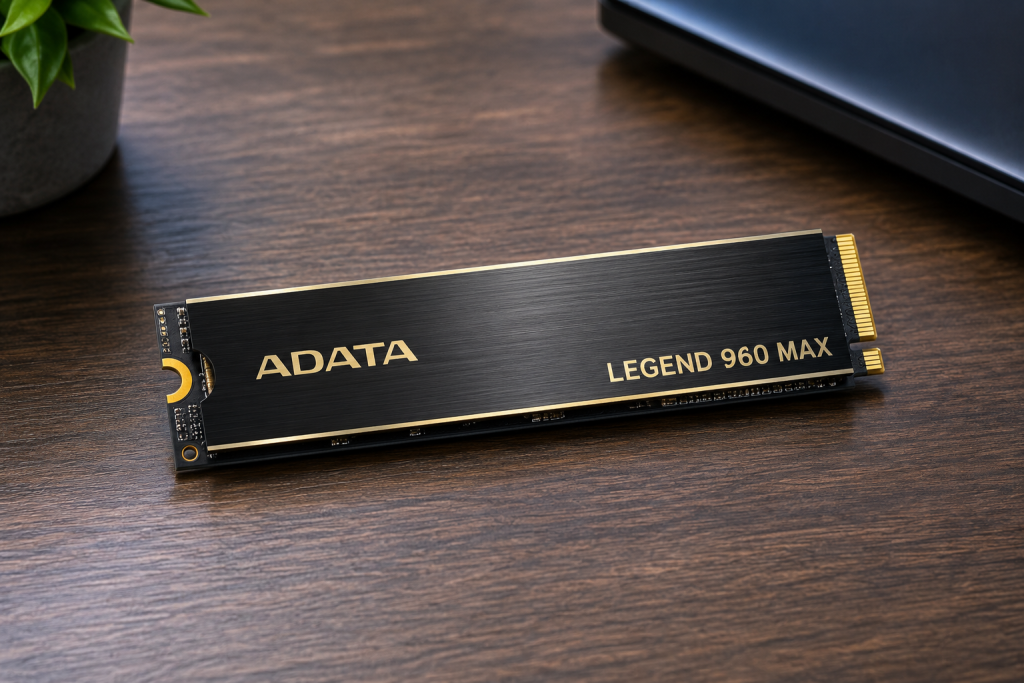
The Legend 960 Max is a PCIe Gen4 x4 M.2 2280 NVMe SSD built around the Silicon Motion SM2264 controller, paired with DRAM cache and 3D NAND flash. It’s essentially a refreshed version of the original ADATA Legend 960, with the headline addition being a beefier heatsink to tame thermal throttling under sustained loads. It’s sold in 1TB, 2TB, and 4TB capacities and is aimed squarely at gamers, content creators, and PC enthusiasts — including PlayStation 5 owners looking for expandable storage, since the heatsink was designed to fit the PS5’s M.2 slot dimensions.
Rated sequential speeds sit at up to <cite index=”1-1″>7,400 MBps for reads and 6,800 MBps for writes, with up to 750,000 and 630,000 IOPS for random reads and writes respectively</cite>. ADATA backs the drive with <cite index=”1-1″>a five-year warranty and a 780TB-per-TB endurance (TBW) rating</cite>.
3. HGST Ultrastar 7K6000 Overview
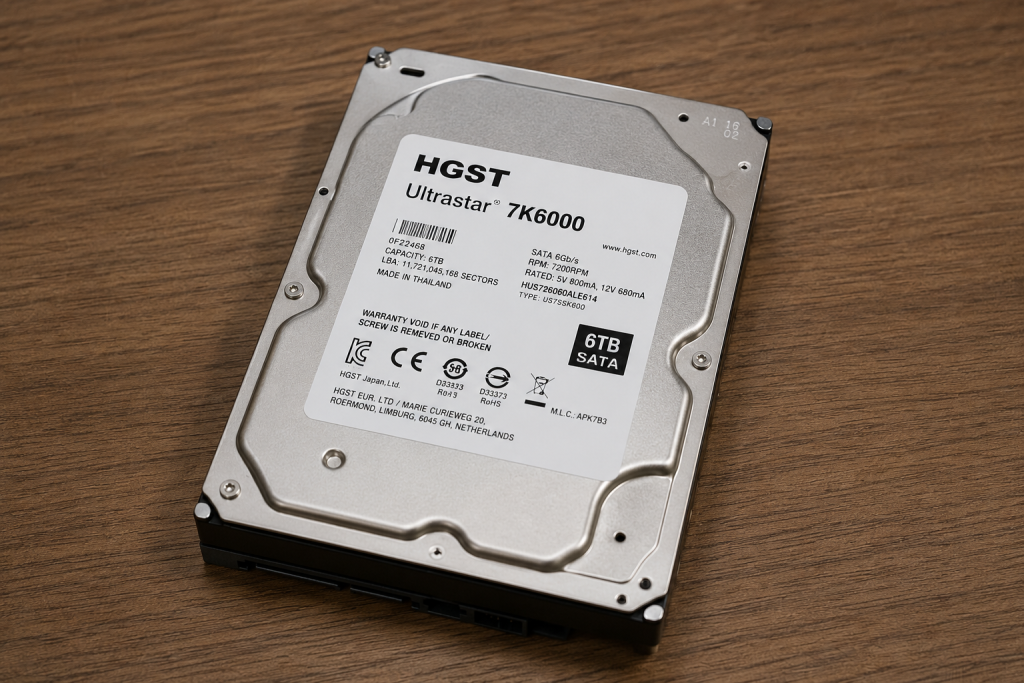
The Ultrastar 7K6000 is a 3.5-inch enterprise hard disk drive from HGST (a Western Digital subsidiary), originally released to address data center capacity demands. It’s a <cite index=”11-1″>seventh-generation, 5-platter design available in SATA (6Gb/s) and SAS (12Gb/s) interfaces</cite>, spinning at a standard <cite index=”10-1″>7,200 RPM with a 128MB cache buffer</cite>. Capacities range from 2TB up to 6TB depending on model and interface.
This drive was built for scale-out storage — object, block, and file storage systems in servers, NAS boxes, and data centers — not for desktop responsiveness. HGST rated it to <cite index=”11-2″>handle workloads up to 550TB per year</cite> and backed it with <cite index=”11-1″>a 2-million-hour MTBF rating and a 5-year limited warranty</cite>. Compared to its predecessor, the 7K4000, HGST claims the 7K6000 delivers <cite index=”11-1,11-3″>50% more capacity, 30% better power efficiency per terabyte, and up to 3x higher random write performance thanks to its media cache architecture</cite>.
4. Key Specifications Comparison
| Spec | ADATA Legend 960 Max | HGST Ultrastar 7K6000 |
|---|---|---|
| Type | NVMe SSD (PCIe Gen4 x4) | Enterprise HDD (7,200 RPM) |
| Form factor | M.2 2280 | 3.5-inch |
| Interface | PCIe 4.0 x4 / NVMe 1.4 | SATA 6Gb/s or SAS 12Gb/s |
| Capacities | 1TB, 2TB, 4TB | 2TB–6TB |
| Sequential read | Up to 7,400 MB/s | Roughly 200–260 MB/s (mechanical limit) |
| Sequential write | Up to 6,800 MB/s | Roughly 200–260 MB/s (mechanical limit) |
| Random IOPS (4K) | Up to 750,000 / 630,000 | A few hundred IOPS |
| Cache | DRAM + SLC cache | 128MB |
| Endurance/rating | 780 TBW per TB | 550TB/year workload rating |
| Warranty | 5 years | 5 years |
| Moving parts | None | Spinning platters, actuator arm |
The gap here isn’t incremental — it’s architectural. NAND flash with no moving parts versus spinning magnetic platters puts these two drives in different performance universes for anything latency-sensitive.
5. Performance Comparison
Read Speed
The Legend 960 Max’s rated 7,400 MB/s sequential read is roughly 30–35x faster than what a 7,200 RPM hard drive like the 7K6000 can sustain (typically 200–260 MB/s at the outer platter tracks, tapering off toward the inner tracks). Independent testing backs up ADATA’s claims: one review recorded <cite index=”2-1″>a maximum sequential read speed of 7,464 MB/s</cite> on the drive.
Write Speed
Sustained sequential writes tell a similar story. The 960 Max is rated for up to 6,800 MB/s, and testing has shown results both slightly above and below that figure depending on the sample and whether the write cache is saturated — one outlet measured <cite index=”8-1″>6,242 MB/s sustained sequential write</cite> after the cache filled. The 7K6000, by contrast, tops out in the low hundreds of MB/s regardless of workload, since it’s bound by platter rotation speed and areal density.
Random Performance
This is where the SSD’s advantage becomes overwhelming rather than just large. The Legend 960 Max is rated for <cite index=”1-1″>up to 750,000/630,000 random read/write IOPS</cite>, and one review even measured it exceeding spec at <cite index=”8-1″>789,000 IOPS on a write benchmark</cite>. A 7,200 RPM HDD like the 7K6000, limited by mechanical seek time, typically manages only low hundreds of random IOPS — a difference of roughly three orders of magnitude. This is the single biggest reason SSDs feel “snappier” in daily use.
Boot Time
Booting an OS from the Legend 960 Max is a matter of seconds — NVMe drives eliminate the seek-time penalty that dominates HDD boot performance. Booting from a 7K6000-class HDD, even in a well-optimized system, will typically take significantly longer, since the OS has to wait on physical head movement to read scattered boot files. In practice, nobody deploys the 7K6000 as a boot drive — it’s a bulk-storage/archive drive that usually sits behind a faster SSD or NVMe boot volume in a server.
6. NVMe SSD vs Enterprise HDD: What’s the Difference?
- Underlying technology: NVMe SSDs store data in NAND flash cells accessed electronically. HDDs store data magnetically on spinning platters read by a physical head — the classic reliability/cost trade-off of decades of storage engineering.
- Interface and protocol: NVMe communicates directly over PCIe lanes with a protocol designed for parallelism and low latency. The 7K6000 uses SATA or SAS, protocols designed decades ago around the assumption of mechanical latency.
- Latency: NVMe access latency is measured in microseconds; HDD access latency is measured in milliseconds — again, roughly a 1,000x difference.
- Cost per gigabyte: HDDs remain dramatically cheaper per terabyte, which is precisely why enterprise HDDs like the 7K6000 still exist and dominate bulk cold/warm storage tiers.
- Use case philosophy: The Legend 960 Max is optimized for speed and responsiveness in single-user or small-scale scenarios. The Ultrastar 7K6000 is optimized for capacity density, low $/TB, and 24/7 reliability across large arrays of drives.
7. Gaming Performance
For gaming, the Legend 960 Max is the obvious choice — and it’s genuinely designed for this market, including PS5 expansion support. Faster level loads, quicker texture streaming, and near-instant game launches are the direct benefit of its NVMe speed and high random IOPS. The 7K6000 was never intended for gaming; using an enterprise HDD as a game drive would mean noticeably longer load times and stutter in games that stream large open-world assets, even though the drive itself is perfectly reliable for what it’s built for.
8. Video Editing & Content Creation Performance
The Legend 960 Max’s sustained sequential write speed matters a lot here — video editing with 4K/8K footage benefits from high throughput for scrubbing, exporting, and working with large project caches. ADATA specifically markets the Legend line at <cite index=”2-1″>content creators, virtual designers, and animators</cite>. Reviewers found the drive took <cite index=”8-1″>60GB of sustained writes to fully saturate its write cache</cite>, which is generally enough headroom for most single-project editing sessions before speeds taper toward the drive’s slower “steady-state” write rate.
The 7K6000 has a role here too, just not as a working scratch disk — it’s well suited as bulk archival storage for finished projects, raw footage backups, or a NAS tier that doesn’t need to be fast, just large and dependable.
9. Business and Enterprise Workloads
This is the 7K6000’s home turf. It was engineered for <cite index=”11-2″>object, block, and file storage architectures in scale-out data centers</cite>, and features like <cite index=”11-2″>Rebuild Assist to speed up RAID rebuild times</cite>, <cite index=”11-1″>Instant Secure Erase, and TCG encryption options with FIPS 140-2 certification</cite> reflect priorities that matter to IT departments and cloud operators — not desktop users. Where a business is deploying hundreds or thousands of drives for bulk data, cost-per-terabyte and proven long-term reliability outweigh raw speed.
The Legend 960 Max, meanwhile, is a consumer-grade drive without the enterprise features (power-loss protection, dual-port SAS, high sustained write endurance at scale) that data centers typically require, even though its TBW rating is respectable for prosumer use.
10. Reliability and Lifespan
Both drives carry 5-year warranties, but reliability is measured differently:
- Legend 960 Max: Endurance is rated in TBW (total bytes written) — <cite index=”1-1″>780TB per TB of capacity</cite>. Flash memory degrades with write cycles, so this figure tells you how much data you can write over the drive’s life before wear becomes a concern.
- Ultrastar 7K6000: Reliability is rated via <cite index=”11-1″>a 2-million-hour MTBF (mean time between failures) and a workload rating of up to 550TB per year</cite>. HDD failure modes are mechanical (bearing wear, head crashes, motor failure) rather than write-cycle-based, and features like <cite index=”12-1″>Rotational Vibration Safeguard sensors</cite> are specifically there to improve reliability in dense, vibration-prone multi-drive racks.
In practice, both are durable within their intended use case, but an SSD has no moving parts to mechanically wear out, while an enterprise HDD is engineered from the ground up to survive constant mechanical operation for years.
11. Power Consumption
NVMe SSDs like the Legend 960 Max generally draw less power at idle and during light use than a spinning 7,200 RPM drive, since there’s no motor to keep platters spinning continuously. The 7K6000 does hold an efficiency edge over its own predecessor — HGST claims <cite index=”11-1″>30% better power efficiency in watts per terabyte versus the 7K4000</cite> — but that’s a comparison to older HDDs, not to flash storage. At the array level, though, HDD makers argue that fewer, larger-capacity drives can still be efficient in W/TB terms for pure bulk storage — an important nuance for data center planners, even if it doesn’t change the SSD’s per-drive efficiency advantage.
12. Noise and Heat Levels
The Legend 960 Max is completely silent, since it has no motors or moving parts — its main thermal concern is heat under sustained load, which is why ADATA added a heatsink to this “Max” variant. Reviewers have recorded peak temperatures in the high-50s to high-60s °C range under sustained testing, with the heatsink needed to avoid throttling.
The 7K6000, like all HDDs, produces audible spindle motor noise and seek noise from the actuator arm — modest but noticeable in a quiet room, and something server-room deployments simply don’t have to worry about. Heat-wise, HDDs run relatively cool per-drive but generate cumulative heat load when racked in dense arrays, which is a data-center cooling design consideration rather than a desktop concern.
13. Storage Capacity Options
- Legend 960 Max: 1TB, 2TB, 4TB — capacities suited to a single system’s OS, games, and active project files.
- Ultrastar 7K6000: 2TB, 4TB, 6TB across SATA and SAS variants — capacities suited to bulk storage, backups, and multi-drive arrays where dozens of these might sit in a single chassis.
If your need is “a few terabytes of fast working storage,” the SSD wins. If your need is “tens or hundreds of terabytes of archival/bulk storage,” HDDs like the 7K6000 (typically deployed in multiples) are the economical choice.
14. Price Comparison
Price per gigabyte tells the real story. NVMe SSDs like the Legend 960 Max have come down significantly in price but still cost several times more per terabyte than enterprise HDDs — one review noted the 1TB Legend 960 Max retailing at <cite index=”8-1″>around $69.99 USD</cite>, putting it in the sub-$0.07/GB range at that capacity. Enterprise HDDs like the 7K6000, being an older mechanical design now typically sold used/refurbished on the secondary market, often price out well under $0.02/GB depending on capacity and condition — though buyers should factor in that most available units are refurbished or pulled from decommissioned servers, since HGST as a brand was absorbed into Western Digital and the 7K6000 is no longer a current-generation product.
15. Pros and Cons
ADATA Legend 960 Max
- ✅ Extremely fast sequential and random performance
- ✅ Silent, no moving parts
- ✅ Compact M.2 form factor, PS5-compatible heatsink
- ✅ Strong 5-year warranty and solid TBW rating
- ❌ Higher cost per terabyte
- ❌ Limited to 4TB max capacity
- ❌ Can thermal throttle without adequate cooling/heatsink
HGST Ultrastar 7K6000
- ✅ Very low cost per terabyte
- ✅ Higher capacities available (up to 6TB)
- ✅ Enterprise-grade reliability features (RVS, Rebuild Assist, encryption options)
- ✅ Proven track record in data centers
- ❌ Far slower sequential and random performance
- ❌ Audible noise and vibration
- ❌ Discontinued/legacy product, mostly available refurbished now
16. Which One Should You Buy?
- Choose the ADATA Legend 960 Max if: you’re building or upgrading a gaming PC, need a fast OS/application drive, edit video or other large media files, or want a PS5 expansion drive. It’s the right tool for anything where speed and responsiveness matter more than raw capacity.
- Choose the HGST Ultrastar 7K6000 if: you need large amounts of storage capacity at the lowest possible cost per terabyte — bulk NAS storage, backups, archival, surveillance recording, or a home server/RAID array where speed is secondary to capacity and reliability.
- Many setups genuinely benefit from both: a fast NVMe drive like the Legend 960 Max for the OS and active work, paired with HDDs like the 7K6000 for bulk storage — this is exactly how most servers and even prosumer NAS builds are architected today.
17. Frequently Asked Questions (FAQ)
Can the HGST Ultrastar 7K6000 be used as a boot drive? Technically yes, but it’s not recommended. Its slow random access and sequential speeds compared to an SSD would make for a sluggish OS experience. It’s designed for bulk/archival storage, not boot duty.
Is the ADATA Legend 960 Max good for a NAS? It can work for a fast NAS cache tier, but it lacks enterprise features like power-loss protection and isn’t designed for the sustained 24/7 write endurance that dedicated NAS or enterprise drives offer. For large-capacity NAS storage, an HDD like the 7K6000 (or its modern successors) is typically the better fit.
Does the HGST Ultrastar 7K6000 support SAS and SATA? Yes — it’s available in both <cite index=”11-1″>12Gb/s SAS and 6Gb/s SATA interface variants</cite>, giving buyers flexibility depending on their server or controller setup.
Why is the Legend 960 Max so much faster than the 7K6000? The fundamental reason is architecture: NAND flash accessed electronically has no mechanical seek time, while an HDD must physically move a read/write head across spinning platters. This is also why the performance gap is largest in random I/O rather than sequential transfers.
Is the HGST Ultrastar 7K6000 still available new? It’s an older enterprise HDD line from HGST (now part of Western Digital), so it’s largely available through refurbished/secondary markets today rather than as a current retail product. Buyers interested in a similar new drive should look at Western Digital’s current Ultrastar DC HC-series lineup.
Which drive has better long-term reliability? Both are reliable within their intended use, but they fail differently. SSDs like the Legend 960 Max wear out based on total data written (TBW), while HDDs like the 7K6000 are more prone to mechanical failure over time. Neither is inherently “more reliable” in isolation — it depends on workload and duty cycle.